Remote IT Support in Australia: What Can a Technician Fix Remotely?
September 16, 2026
Computer Virus Removal: How to Remove a Virus?
October 2, 2026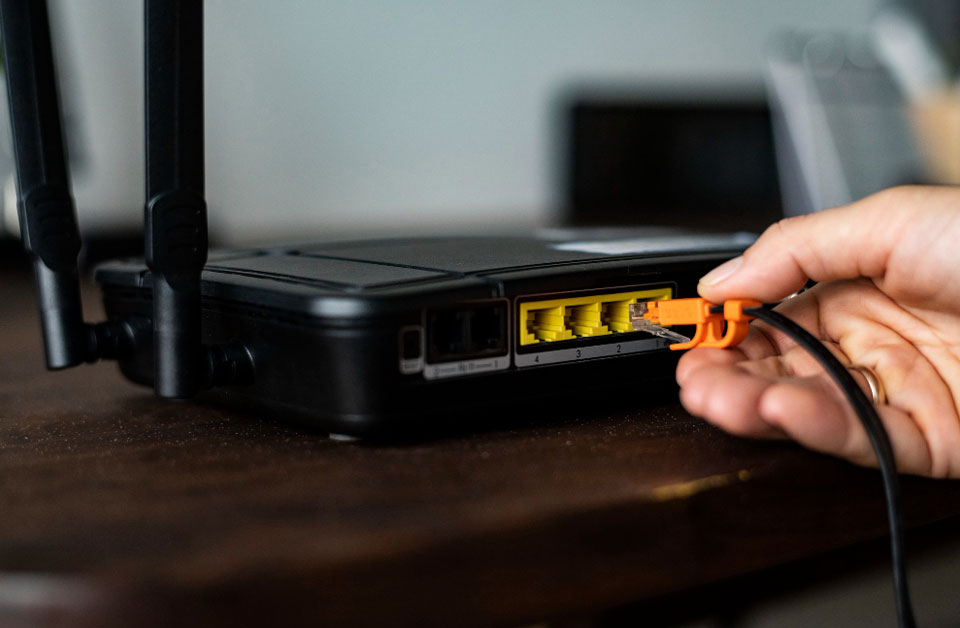
Do I need a technician to install my internet? Not always. Some connections are easy to set up yourself, while others need professional installation. It depends on your internet service, equipment and the work required at your property.
There is also a difference between getting an internet service connected and setting up your home network. Your provider or nbn may handle the connection to your property, while your modem, router, Wi-Fi and connected devices still need to be configured.
If you are unsure what needs to be done, a local IT technician can help you get everything working properly.
Can I Install My Internet Myself?
In some cases, yes. If your service is already active and you have the correct modem or router, you may be able to complete the setup using the instructions from your internet provider.
For example, some Fibre to the Node (FTTN) connections use a provider-supplied VDSL2 modem that customers can connect themselves. nbn says the provider will advise whether a technician appointment is needed for the particular connection.
A basic home setup may involve:
- Connecting the modem or router to the correct outlet
- Connecting the power supply
- Connecting an Ethernet cable where required
- Waiting for the equipment to establish a connection
- Setting up your wireless network
- Connecting phones, computers, TVs and other devices
- Checking that the connection works
If everything works after these steps, you may not need additional technical help.
When Do You Need a Technician?
The answer depends on the type of connection and what needs to be installed.
Some nbn technologies have different installation requirements. For example, nbn states that FTTP equipment is installed by an approved installer or service provider. Eligible HFC premises may have a self-installation option, while other properties may require an approved installer. You may also want professional help when the internet service is active but your home network is not working as expected.
Common reasons include:
- The modem will not connect
- The router needs configuration
- Wi-Fi does not reach all rooms
- Some devices cannot connect
- The connection keeps dropping out
- Internet speeds vary around the home
- You have several devices to configure
- You are unsure which cables or ports to use
- You need help securing your wireless network
A technician can look at the whole setup instead of focusing on one device.
Does NBN Installation Require a Technician?
Not every NBN connection follows the same process. Your internet provider should tell you what happens before your connection is activated and whether an appointment is required. The process depends on the technology available at your property.
Fibre to the Premises
With Fibre to the Premises (FTTP), fibre reaches the property and an nbn connection box is installed inside. nbn states that this equipment requires installation by an approved nbn installer or service provider.
Once the nbn equipment is ready, your internet provider’s router or gateway can be connected according to their instructions.
Fibre to the Node
FTTN uses fibre to a nearby node and existing copper cabling for the final part of the connection.
After the service has been activated, the provider-supplied modem can usually be connected to the telephone wall socket. nbn describes this as a self-installation step for suitable FTTN services.
Hybrid Fibre Coaxial
HFC connections can have different installation arrangements. nbn says eligible premises may be able to self-install the supplied connection box, while other properties may need an approved installer.
This is why it is best to follow the instructions from your internet provider rather than assuming every nbn connection works the same way.
What About Wi-Fi Setup?
Getting an internet service connected is only part of the job.
Your home also needs a working wireless network. The position of the router can affect coverage, while walls, distance and other sources of interference can affect the signal.
You may notice problems such as:
- Strong Wi-Fi in one room but weak signal elsewhere
- A smart TV that keeps disconnecting
- Mobile devices switching between weak and strong signals
- Slow wireless speeds
- Devices that cannot find the network
- Frequent connection dropouts
These problems do not always mean you need a faster internet plan.
The issue could be related to router placement, wireless settings, the number of connected devices or the layout of the home. A technician can check the network and help identify where the problem is.
What Does an Internet Technician Actually Do?
An IT technician can help with the equipment and network inside your property. Depending on the problem, this can include:
- Modem and router configuration
The technician can check the equipment and configure the settings required for your connection. - Wi-Fi setup
Your wireless network can be configured and connected to the devices you use at home. - Device connection
Computers, smart TVs, printers and other compatible devices can be connected to the network. - Network troubleshooting
If the connection is unstable or certain devices cannot get online, the technician can investigate the cause. - Wi-Fi coverage checks
The network can be checked in different areas of the property to identify weak coverage. - Basic network security
Your wireless settings can be reviewed to help keep your home network secure.
The exact support you need will depend on your equipment and internet service.
Should You Install Your Router Yourself?
You can if you are comfortable following your provider’s instructions and your equipment is ready to use.
However, router setup can involve more than plugging in a cable. You may need to enter connection details, change wireless settings, create a Wi-Fi password and reconnect your devices.
If you have a simple setup, this may only take a short time. If you have several devices or an existing network, professional assistance can save time and help avoid configuration problems.
When Is Professional Help Worth It?
You do not necessarily need a technician for every internet installation. Professional support becomes useful when you have already followed the provider’s instructions but something still does not work.
It can also help when you want your entire home network checked rather than simply getting one device online.
For example, you may have recently moved into a property and need help connecting your router, computers, smart TV and other devices. Or your internet may work well near the router but become unreliable in other rooms.
In these situations, an experienced technician can check the setup and explain what is causing the problem.
Home Internet Setup in Darwin and Palmerston
If you need help with your home network, Techie4NT provides home internet setup services in Darwin and Palmerston.
The service includes new internet connection setup, home wireless internet setup, modem and router configuration, Wi-Fi network setup, device connections, internet and network troubleshooting, Wi-Fi security and network performance checks.
The aim is simple. We connect your equipment, configure your network and help you use your internet without unnecessary technical confusion.
Frequently Asked Questions
Not always. Some connections can be set up by the customer after the service has been activated. If you need an authorised installer, your provider will let you know.
Yes, if your router and internet service are ready. You can follow the setup instructions supplied by your provider. Professional help may be useful if you have coverage or configuration problems.
It depends on your nbn technology and property. Some connections involve an approved installer, while eligible services may allow self-installation. Your internet provider should confirm what applies to your address.
The problem can be due to router placement, wireless interference, network settings, connected devices or weak coverage. Checking the network can help identify the cause.
A technician can check the wireless signal around your home, review router placement and recommend practical ways to improve coverage.
Final Thoughts
So, do I need a technician to install my internet? It depends on your connection and the work required.
Some services are suitable for self-installation. Others require an approved installer. Even when the internet connection itself is ready, you may still need help with your modem, router, Wi-Fi or home network.
If you are having trouble getting connected or want help setting up your network, Techie4NT provides local internet and Wi-Fi support across Darwin and Palmerston.